
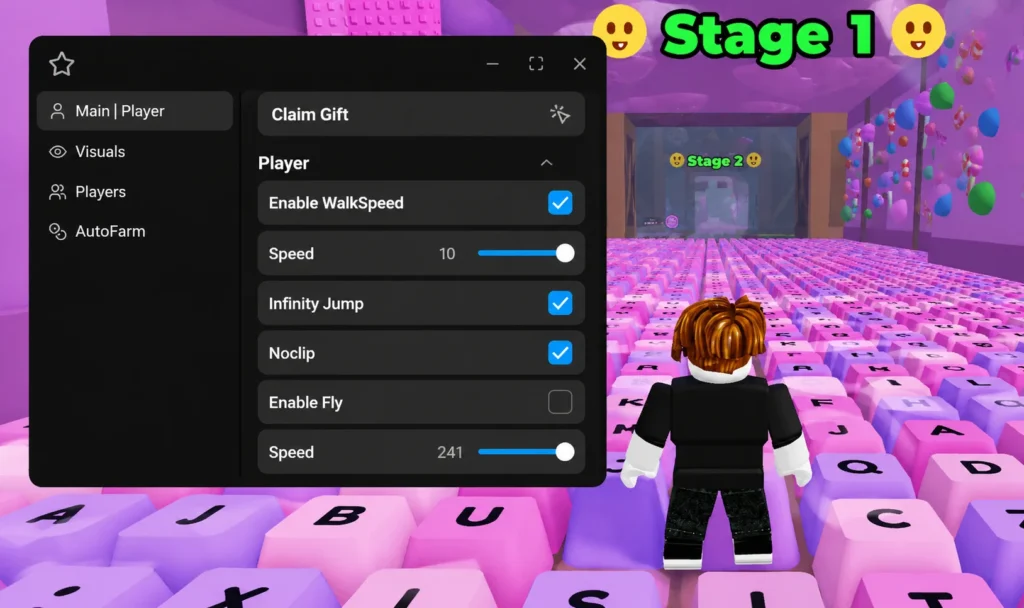
Void Hub +1 Speed Slime Keyboard Escape Script Keyless offers quick script access without a key system, helping players enjoy smoother gameplay and faster setup.
Script
Speed Slime Keyboard Escape Script Void Hub
🐌Speed Slime Supported🔮Keyboard Escape Supported⚡Speed Boost🌾Auto Farm📍Teleport🏃Auto Escape🎮Void Hub🛠️Easy Script Execution
💻 LUA CODE:
loadstring(game:HttpGet("https://pastefy.app/LkuXPOXe/raw"))()
How to Use?
Using the +1 Speed Slime Keyboard Escape Script is simple. Before getting started, make sure you have a compatible Roblox script executor installed on your device.
- Launch Roblox and join the +1 Speed Slime Keyboard Escape game.
- Open your preferred script executor.
- Copy the latest +1 Speed Slime Keyboard Escape Script.
- Paste the script into the executor’s script editor.
- Click Execute to load the script.
- Wait a few seconds for the script interface to appear.
- Enable the features you want, such as Auto Farm, Auto Speed, Auto Rebirth, or other available options.
- Return to the game and enjoy the automated gameplay.
Always use the latest version of the script to ensure compatibility with recent game updates and to reduce the chances of errors.