
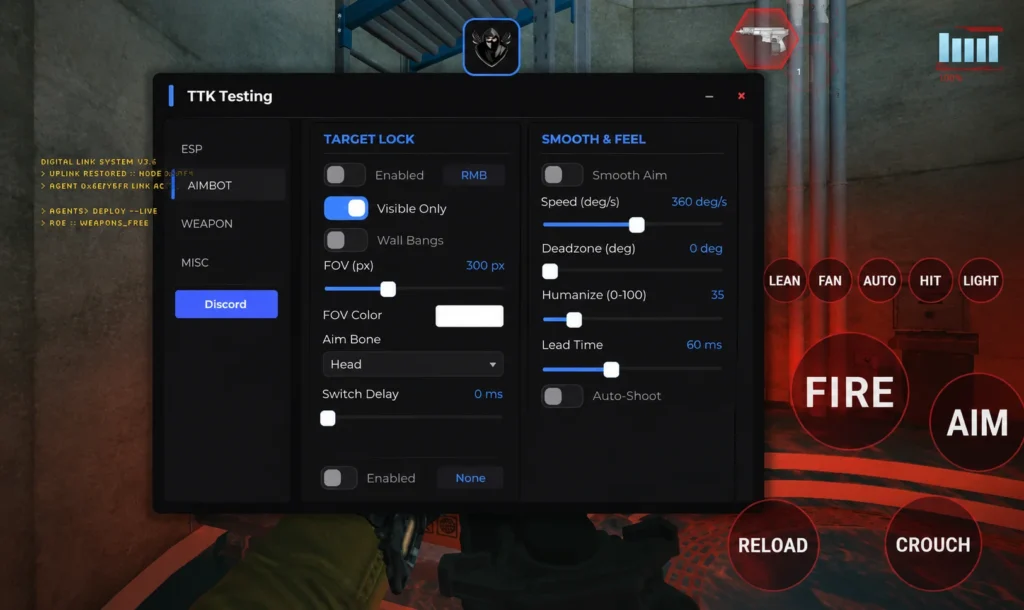
Get the latest TTK Testing Script with keyless support, smooth execution, easy setup, and regular updates to enhance your Roblox gameplay experience.
Script
TTK Testing Script Over Hub
🎯TTK Testing🚜Auto Farm👁️ESP📍Teleport🏃WalkSpeed🔮JumpPower👻Noclip🕊️Fly🛡️Anti AFK🛠️Over Hub
💻 LUA CODE:
loadstring(game:HttpGet("https://overhub.dev/loader.lua"))()
MultyHub TTK Testing Script
💻 LUA CODE:
loadstring(game:HttpGet("https://github.com/PLU3t0/Meathead/raw/refs/heads/main/Ttk/ttk.luau"))()
OP TTK Testing GUI Silent Aim Script
💻 LUA CODE:
loadstring(game:HttpGet("https://keysystem.work.ink/scripts/019f0535-1917-722f-90c1-2b858505040a"))()
Axon Hub TTK Testing Script
💻 LUA CODE:
loadstring(game:HttpGet("https://api.luarmor.net/files/v3/loaders/97c3f6db55a2cf72141537a85458e5a7.lua"))()
OP TTK Silent Aim Open Source Script
💻 LUA CODE:
local Players = game:GetService("Players")
local RunService = game:GetService("RunService")
local RS = game:GetService("ReplicatedStorage")
local Gun = require(RS.Modules.Client.Controllers.GunController)
local me = Players.LocalPlayer
local on = true
local fov = 120
local maxDist = 2000
local wallbang = false
local tgt
local tgtPart
local inBullet = 0
local pov
pcall(function()
pov = require(RS.Modules.Client.CameraPOV)
end)
local circle = Drawing.new("Circle")
circle.Filled = false
circle.Thickness = 1
circle.Color = Color3.new(1, 1, 1)
circle.NumSides = 48
local function eye()
if pov and pov.GetEyePosition then
return pov.GetEyePosition()
end
local cam = workspace.CurrentCamera
if cam then
return cam.CFrame.Position
end
end
local function muzzle()
local cf = Gun.GetMuzzleWorldCFrame and Gun:GetMuzzleWorldCFrame()
if cf then
return cf.Position
end
return eye()
end
if hookfunction then
local BC = require(RS.Modules.Client.Controllers.BulletController)
local SU = require(RS.Modules.Shared.SpreadUtil)
local oldDischarge = hookfunction(BC.Discharge, function(self, weapon, eyePos, fireDir, muzzleCf, ...)
if on and Gun.FireHeld and tgt then
local from = muzzleCf and muzzleCf.Position or eyePos or muzzle()
fireDir = (tgt - from).Unit
inBullet += 1
local out = { oldDischarge(self, weapon, eyePos, fireDir, muzzleCf, ...) }
inBullet -= 1
return table.unpack(out)
end
return oldDischarge(self, weapon, eyePos, fireDir, muzzleCf, ...)
end)
local oldSpread = hookfunction(SU.RandomConeDirection, function(dir, ...)
if on and Gun.FireHeld and tgt then
return dir
end
return oldSpread(dir, ...)
end)
if wallbang then
local oldRay = hookfunction(workspace.Raycast, function(origin, dir, ...)
if inBullet > 0 and on and Gun.FireHeld and tgtPart then
local delta = tgt - origin
local dist = delta.Magnitude
if dist > 0.01 and dist 0.001 then
if dir.Unit:Dot(delta.Unit) >= 0.25 then
return {
Instance = tgtPart,
Position = tgt,
Normal = -delta.Unit,
Distance = dist,
Material = tgtPart.Material,
}
end
end
end
return oldRay(origin, dir, ...)
end)
end
end
RunService.PreRender:Connect(function()
tgt = nil
tgtPart = nil
if not on then
circle.Visible = false
return
end
local cam = workspace.CurrentCamera
if not cam then
return
end
local mid = cam.ViewportSize / 2
circle.Position = mid
circle.Radius = fov
circle.Visible = true
local eyePos = eye()
if not eyePos then
return
end
local mercs = workspace:FindFirstChild("MercPlayers")
local closest
local closestPx = fov
for _, plr in Players:GetPlayers() do
if plr ~= me then
local folder = mercs and mercs:FindFirstChild("MercHitboxes_" .. plr.Name)
if folder and folder:GetAttribute("Dead") ~= true then
local head = folder:FindFirstChild("Head")
if not head then
for _, p in folder:GetDescendants() do
if p:IsA("BasePart") and p.Name == "Head" then
head = p
break
end
end
end
if head and (head.Position - eyePos).Magnitude 0 then
local px = (Vector2.new(scr.X, scr.Y) - mid).Magnitude
if px < closestPx then
closestPx = px
closest = head
end
end
end
end
end
end
if closest then
tgtPart = closest
tgt = closest.Position + Vector3.new(0, closest.Size.Y * 0.15, 0)
end
end)
Infinite Ammo Open Source Script
💻 LUA CODE:
local RunService = game:GetService("RunService")
local RS = game:GetService("ReplicatedStorage")
local GunController = require(RS.Modules.Client.Controllers.GunController)
local hf = hookfunction
local nc = newcclosure or function(f) return f end
local cf = clonefunction or function(f) return f end
local cfg = { infiniteAmmo = true }
local function keepAmmo(weapon)
if type(weapon) ~= "table" or not cfg.infiniteAmmo then
return
end
local max = weapon.MaxMagSize or 30
weapon.AmmoType = "none"
weapon.MagAmmo = max + 1
if weapon._magazines then
for i = 1, #weapon._magazines do
weapon._magazines[i] = max
end
end
end
if hf then
local ok, FS = pcall(require, RS.Modules.Shared.FirearmState)
if ok and FS.Fire then
local origFire = cf(FS.Fire)
hf(FS.Fire, nc(function(self, ...)
if type(self) == "table" then keepAmmo(self) end
local result = origFire(self, ...)
if type(self) == "table" then keepAmmo(self) end
return result
end))
end
if ok and type(FS.GetReserve) == "function" then
local origReserve = cf(FS.GetReserve)
hf(FS.GetReserve, nc(function(self, ...)
local reserve = origReserve(self, ...)
if cfg.infiniteAmmo and type(self) == "table" and reserve
How to Use?
- Launch Roblox and join.
- Open your preferred script executor.
- Copy the latest ASMR Squishy Wallhop Tower script from a trusted source.
- Paste the script into the executor.
- Attach or inject the executor into the game according to its instructions.
- Click Execute to run the script.
- If the script includes a GUI, enable or disable the available features as needed.
- Rejoin the game or use an updated version of the script if it stops working after a game update.
Tips:
- Always use the latest version for the best compatibility.
- Only download scripts from sources you trust.
- Keep your executor updated to reduce compatibility issues.
- Some scripts may stop working after Roblox or game updates and require a newer version.